Stock Control
Stock, under control. That's the whole job.
Stock Control is a stock management system built for shops, depots, pharmacies, salons and workshops. One login, on your phone or a laptop, showing every item you carry: how many are on hand, which are running out, what the whole lot is worth, and what changed since last week.
It does not require an online shop, and it isn't a website with an admin page bolted on. If you never want to sell over the internet, nothing here goes unused: you get a stock system and that's it. If you do want a public catalogue or online orders later, that's an additional module we can switch on, and your stock keeps driving it.
This isn't a template we resell. We've delivered 20+ builds on this stack, and Stock Control is the part that kept getting rebuilt until it settled. The modules, the counting flow, the alerts and the security model are now fixed; what gets configured for you is your vocabulary, your fields, and which optional modules you actually need.
Screenshots throughout are captured live from our interactive demo, not from a client account. Every item, figure and name shown is fictional, built purely to give you a feel for what Stock Control can do. No client's live records are shown here or anywhere on this page.
If stock lives in a notebook, this replaces it
Built for businesses carrying between a handful and a few thousand items, where one or two people are responsible for knowing what's on the shelf.
The situation now
- Stock is counted into a notebook or a phone note, and nobody's fully sure it's current.
- You find out something ran out when a customer asks for it.
- Nobody can answer "what is our stock worth right now" without a full manual count.
- The spreadsheet exists, but it's on one laptop, and the version on WhatsApp is three weeks old.
- Slow-moving items sit for months because nothing flags them.
- The off-the-shelf options are priced monthly in dollars, for far more system than you need.
With Stock Control
- One login, same numbers for everyone, updated the moment someone changes them.
- Low and out-of-stock items surface themselves in a panel you clear like a to-do list.
- Stock value calculated live from cost and quantity on hand.
- Works on the phone in your hand while you're standing at the shelf.
- Search and sort by name, category, supplier or stock level in a second.
- Bought once or paid monthly in Kwacha, and priced for a business your size.
Four modules, one sidebar
Deliberately small. Four navigation items, because a system with fourteen menus gets abandoned for the notebook by week three.
Opens by default
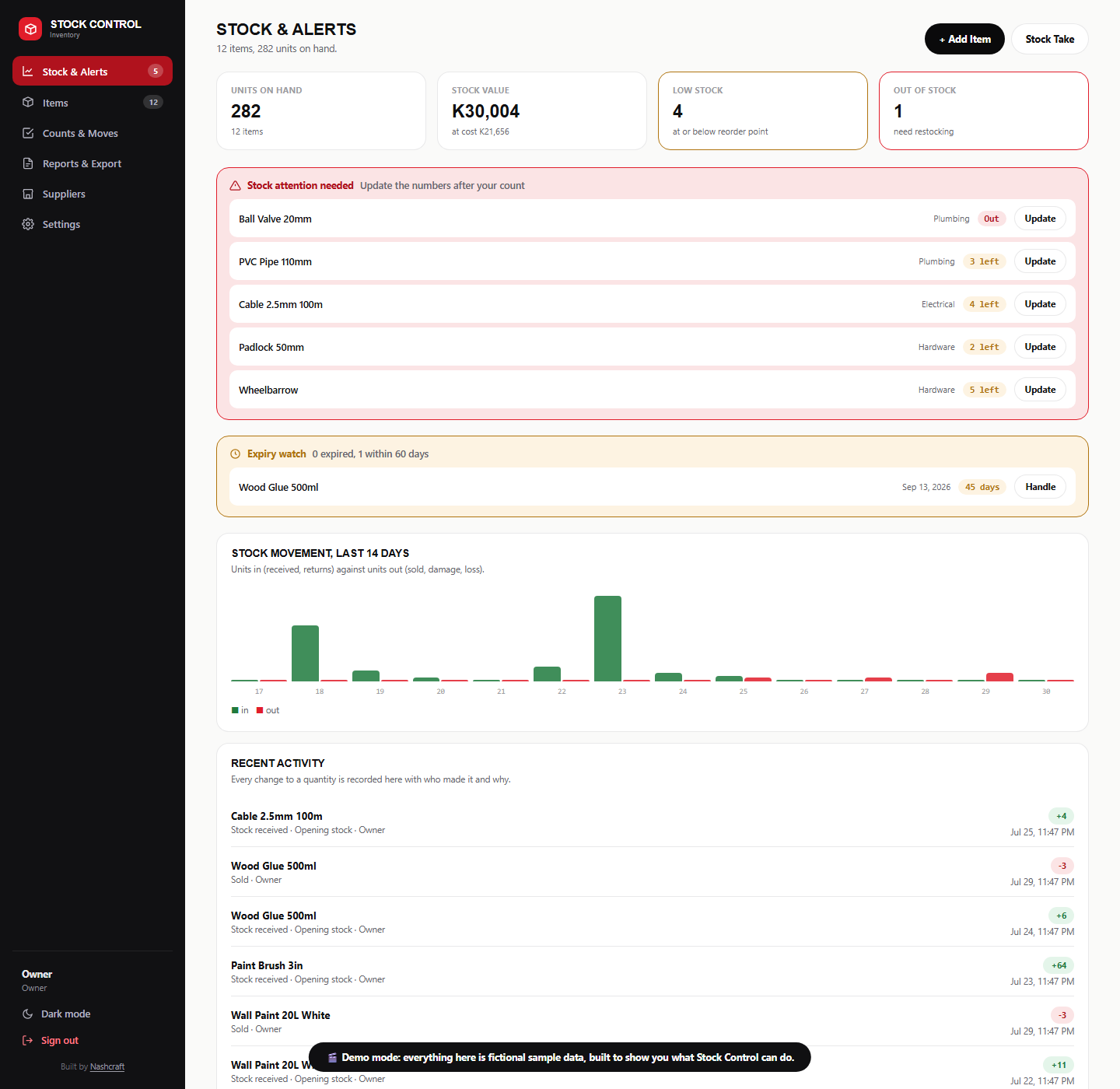
Four summary figures across the top (units on hand, healthy stock, low stock, out of stock) and total stock value. Underneath, the piece clients react to most: a stock attention panel that only appears when something needs it, listing every low and out-of-stock item by name with the quantity left and an Update button that jumps straight into that item.
After a count, you work down that list and clear it. That's the loop the whole system is built around.
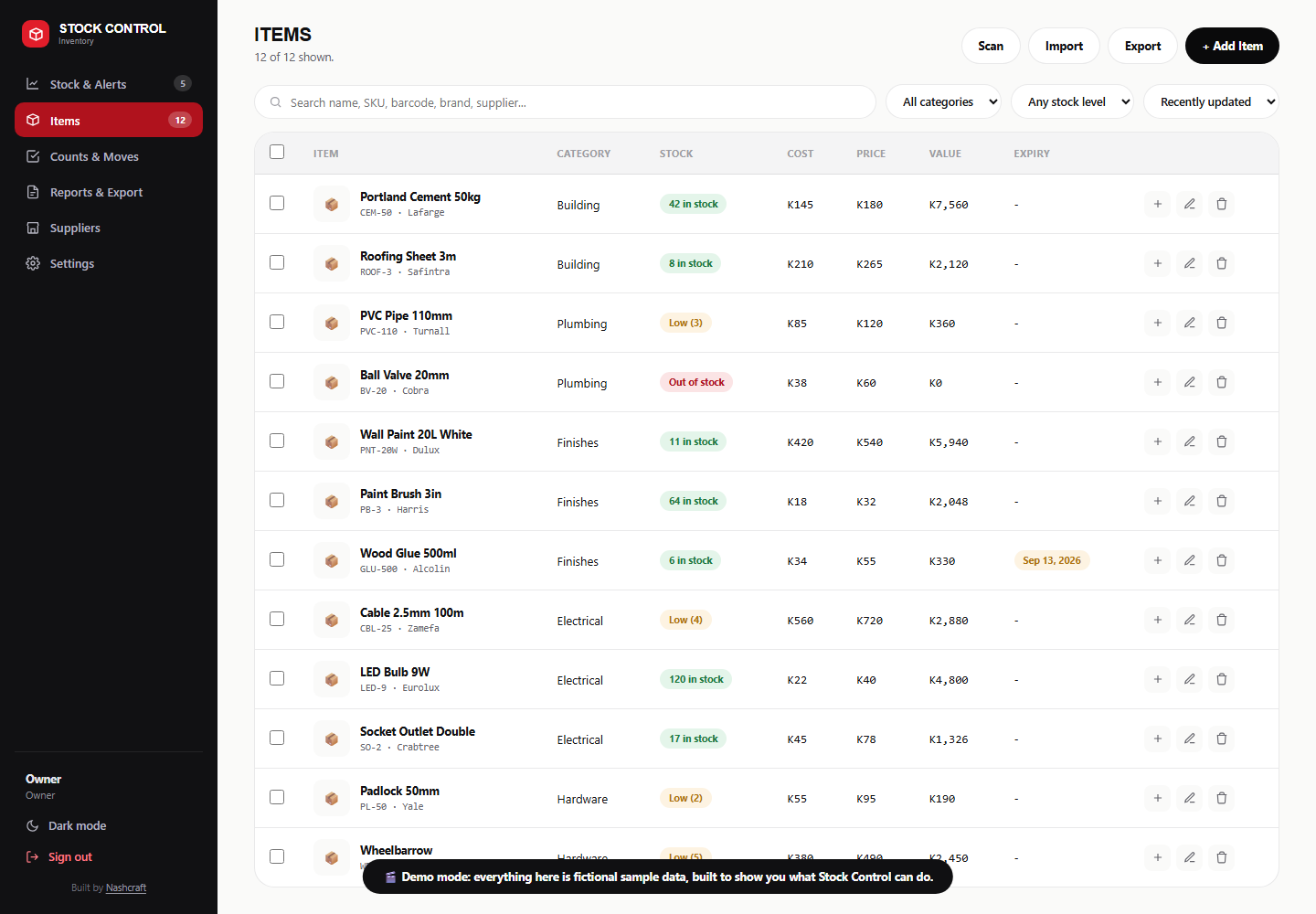
- Live search across name, category and supplier as you type
- Sort by stock level, name, price or most recently added
- Colour-coded badges for in stock, low and out
- Low-stock threshold set to suit your business, not a fixed number
- Stock value totalled live across the catalogue
- Bulk updates: mark a whole selection out of stock or restocked in one action
- Expiry dates with an early-warning count, for stock that dates
- Status labels for coming soon, restocking and discontinued items
Four guided steps
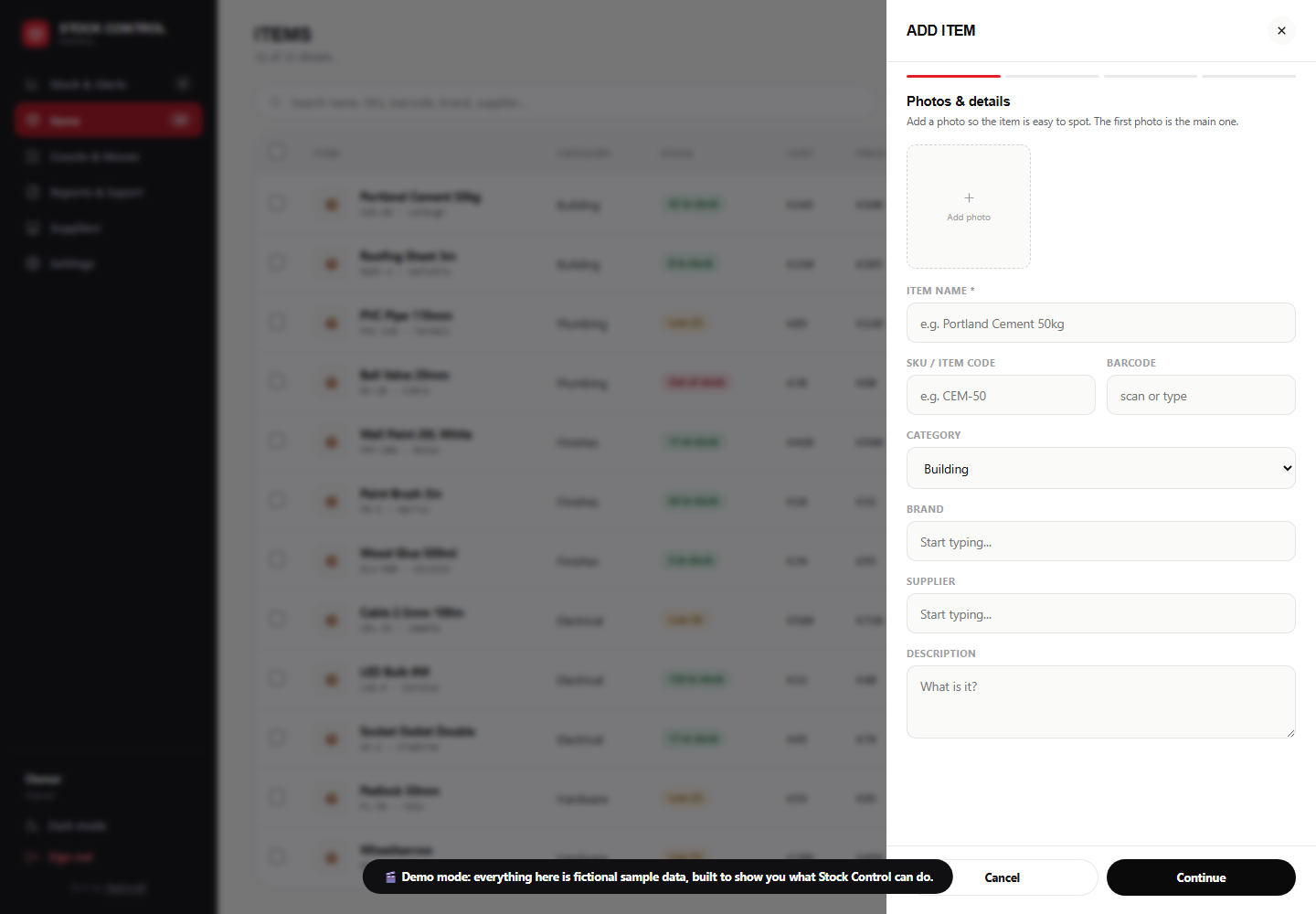
Adding an item is the task you'll do most, and it's where most systems lose people by opening a wall of thirty fields. Ours is a four-step form with a progress bar that won't advance until the step is valid: no name, no continue; no price, no continue.
Photos come first, because that's the order people think in: tap the plus, pick straight from your phone, carry on typing while they upload. Step four shows you the finished item before you save it.
- Step 1: photos, name, category, description
- Step 2: cost price, selling price, quantity, expiry, notes
- Step 3: variants: sizes, shades, colours or options, each with its own quantity and price
- Step 4: labels, then review and save
- Photo upload straight from the camera roll, multiple at a time
- Autocomplete on brands and suppliers, so one name doesn't become four spellings
- Same form for editing, so there's only one thing to learn
- Categories and departments in your own words, managed by you
Weekly or monthly
Numbers only stay useful if correcting them is easy. Every quantity is editable in place, and a physical count is a pass down the attention panel rather than a spreadsheet reconciliation.
Where a business needs to know why a number changed (sold, received, damaged, written off, returned), we add the movement history module, which turns the single quantity into a running record with a reason and a timestamp on every change.
- Edit any quantity in place, from the list or the item
- Update straight from the alert panel, no searching
- Bulk adjustments across a selection
- Confirmation on anything destructive
- Movement history: every change logged with a reason (module)
- Reorder points per item, flagged when they're hit (module)
- Write-offs for damage, loss and expiry (module)
- Stock take mode: count sheet in, variances out (module)
Monthly
What's on hand, what it's worth, what's moving and what isn't. The figures on the main screen cover the day-to-day; the reporting module covers the questions you get asked at month end and by whoever does your books.
Export to Excel is the one almost every client asks for, and it's the cleanest handover there is: your full item list with quantities, cost, selling price and stock value as a spreadsheet you can email, file or hand to an accountant.
- Live stock valuation across the catalogue
- Low and out-of-stock lists, always current
- Expiring soon with a configurable window
- Excel / CSV export of the full item list and stock values (module)
- Excel / CSV import to load an existing list in bulk (module)
- Stock movement report over any date range (module)
- Dead stock report: what hasn't moved (module)
- Printable count sheets for a manual stock take (module)
Everything on the table
Ticked items are included in every build. Plus items are modules: real work, scoped and quoted with you, rather than pretended to be free. We'd rather price them honestly than hide them in a footnote.
Stock Control
The core of the system.
- Quantity on hand per item
- Low-stock and out-of-stock alertsSurfaced in a panel, with a configurable threshold
- Live stock valuation
- Colour-coded stock status badges
- Bulk mark out of stock / restocked
- Expiry dates with early warning
- Variants with their own quantitiesSizes, shades, colours, pack sizes
- Reorder points and reorder suggestions
- Movement history with a reason per change
- Write-offs for damage, loss and expiry
- Stock take mode with variance reporting
- Multiple locations or storerooms
Items & Catalogue
What you carry, described your way.
- Four-step guided add and edit
- Photo upload from phone or laptopSeveral at once, first photo is the main one
- Cost price and selling price
- Categories or departments you control
- Brand and supplier autocomplete
- Descriptions, notes and specifications
- Search across name, category and supplier
- Sorting by stock, price, name or date added
- SKU or item codes
- Barcode scanning to find and count items
- Supplier records and purchase history
- Purchase orders and goods-received capture
Reports & Export
Getting the numbers out of the system.
- Live totals: units, value, low, out
- Low / out-of-stock and expiring lists
- Export to Excel or CSVFull item list with quantities, cost, price and value
- Import from Excel or CSVLoad an existing list in bulk at setup
- Stock movement report by date range
- Dead stock and slow-mover report
- Stock valuation history over time
- Margin report from cost against selling price
- Printable count sheets
- Charts and dashboard graphs
- Scheduled monthly email summary
Access & Practicalities
Who gets in, and how it holds up.
- Password-protected, single owner accountAccess enforced server-side, not by the page
- Works on phone, tablet and laptopBuilt phone-first, because you're at the shelf
- Light and dark mode
- Hosting, domain and SSL handled
- Regular backups of your item list
- Written owner's guide and a live walkthrough
- No per-sale commission, ever
- Staff accounts with roles and permissions
- Activity log of who changed what
- Offline-tolerant use with later sync
- Install-to-homescreen app version
If you ever want to sell online
Skip this section entirely if you don't. Nothing above depends on it, but because your stock already lives in the system, adding a public side later is an extension rather than a second system to keep in sync.
Two ways it gets used. Some clients add a public catalogue only: customers browse what's in stock and message to buy, so nothing changes about how you take payment. Others add the full order pipeline: baskets are logged as orders with a reference, and you move each one through New, Confirmed and Delivered. Either way, when a quantity drops in Stock Control, the public side reflects it on the next page load.
- Public catalogue showing live stock, with no checkout at all
- Order pipeline with references, line items and status
- WhatsApp checkout, which is where most local buying actually happens
- Order receipts customers can open from a link
- Automatic stock deduction as orders come through
- Customer accounts and order history
- Promotional labels: new in, on sale, featured, clearance
- More than one shopfront run from the same login
One database, no server to babysit
Your data lives in a managed cloud database. The system is a page that reads and writes it directly, no server of ours in the middle to go down, and no sync job that can fall behind.
Your Login
You sign in with an email and password. Add items, edit quantities, upload photos, run reports.
Cloud Database
Your item list, quantities and photos, held on Google's infrastructure with permissions enforced on their side.
Optional Public Side
A catalogue or shop reading the same stock, if you ever want one. Left off entirely if you don't.
On security
The login screen isn't the lock. The real protection is a set of rules stored with the database and enforced by Google on every read and write, whatever page the request comes from. They say, in effect: only this one verified email address may change stock, and nothing else may write at all. That holds even if someone finds the address of your system, because the rules don't care which page is asking, only who is signed in.
Being straight about the trade-off: one owner account means no per-staff audit trail out of the box, and stock is stored as a current quantity rather than a full ledger. If you need several logins with different permissions, or a record of every movement, those are the staff accounts and movement history modules, and your system is marked noindex so it never appears in search results.
Boring on purpose
No framework, no plugins, nothing to update on a Friday night. That's the reason it still opens and runs years later, and the reason a support visit takes minutes.
| Layer | What we use | What it means for you |
|---|---|---|
| The system itself | Hand-written HTML, CSS and JavaScript | No WordPress, no plugins, no theme. Nothing that breaks on an update, and no plugin licences to renew. |
| Database | Google Cloud Firestore | Your data on Google's infrastructure, not a machine under a desk. Free at the volumes a shop generates. |
| Login | Firebase Authentication | Sign-in handled by Google, including password resets. We never store your password. |
| Photos | Firebase Storage | Upload straight from your phone; images served fast from a global network. |
| Hosting | Firebase Hosting | Free SSL, fast worldwide, and an instant rollback if anything ever goes wrong. |
| Devices | Any modern browser | Phone, tablet, laptop, shared computer. Nothing to install and nothing to keep updated. |
Phone-first, not phone-tolerant. These systems get used from a phone far more than a laptop, because the person updating stock is standing in front of it. So the menu collapses to a slide-out, the table drops its least useful columns instead of scrolling sideways, the add-item form becomes a full-height sheet, and photo upload goes straight to your camera roll.
Three core screens, one live demo
Vocabulary, fields and which modules are switched on get configured per client. What doesn't change is this core: the same three screens, working the same way, whichever business it's built for. Click through, sign in with one tap, no password needed.
Units on hand, stock value, low and out-of-stock counts, then the attention panel: exactly what needs restocking, cleared one tap at a time.
Every item with cost, price, value and expiry, searchable and filterable in a second, with bulk actions for updating many at once.
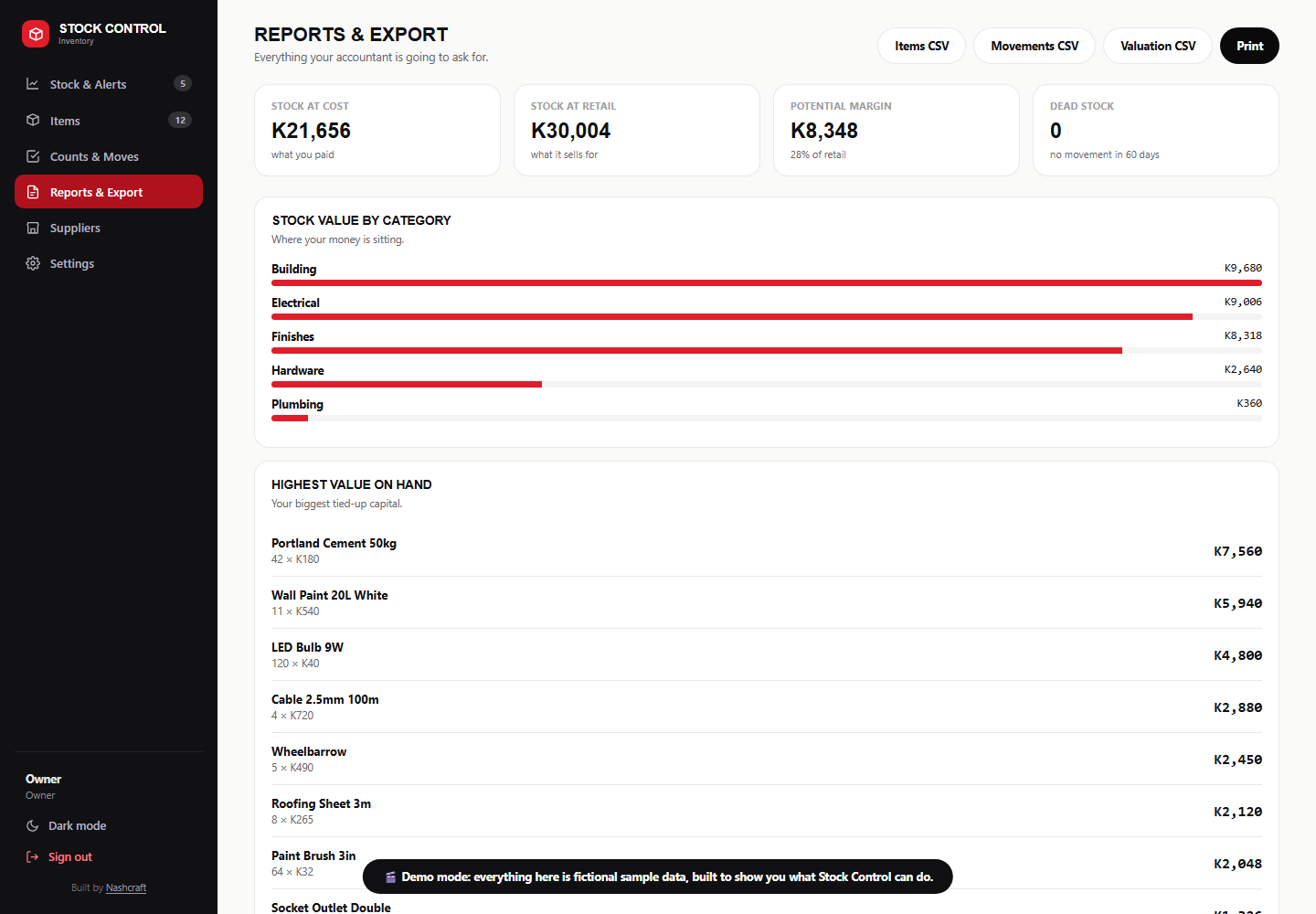
Stock at cost and retail, potential margin, value by category and your biggest tied-up capital, exportable to Excel in a click.
Three to five days, start to running
Three to five working days from agreed scope to you using it unaided. We have built enough of these to be quick about it, so the long part is never the build: it's getting your real item list in.
We go through what you carry. Do items have sizes or options? Does stock expire? One storeroom or several? What do you call a category? Which modules genuinely earn their place. You get a written scope and a fixed price.
System configured to your business, database and permissions set up, your login created. We load a first batch of your real items ourselves, from a spreadsheet if you have one, so you never face an empty screen.
A live walkthrough on your own phone, plus a written guide covering the jobs you'll actually do: add an item, change a price, update a count, run a stock take. You do it while we watch, and we fix whatever trips you up.
Two weeks of close support while it becomes habit, then the monthly plan takes over. Same person, same number, nothing gets handed to a support queue.
What the monthly fee covers
This is operational software with your live stock in it, not a poster. The monthly plan exists because that needs someone watching it, and because you need a number to call when something looks wrong at 4pm on a Friday.
Included if you take the monthly model. Optional add-on if you bought the system outright.
Covered by the monthly
- Everything above, on a rolling month
- Price, name and label corrections
- Adding or renaming categories and suppliers
- Recovering an item deleted by mistake, where a backup covers it
- Password and access recovery
- Diagnosing and fixing wrong stock figures
Quoted separately
- New modules: reporting, Excel export, movement history, staff roles, barcodes
- Adding a public catalogue or online shop
- Accounting or payment integrations
- Redesigning the system
- Bulk data entry beyond the 5 monthly changes
- Moving your data onto another platform
Maintenance is billed on your agreed date on a minimum six-month term. Payments more than five working days late may result in temporary suspension. Full terms are in the agreement provided before your first payment, the same terms as every other Nashcraft plan.
Two ways to buy it
Priced as a system, not a subscription to a platform. There is no commission on anything you sell, in either model.
Own it outright
- Built, set up and handed over. You own the system and your data.
- From $175 for a working stock system with your items loaded.
- Hosting stays free for as long as you're with us.
- Maintenance optional: without it, changes are billed per piece of work.
- Modules such as Excel export, movement history or staff roles are quoted on top.
Pay monthly
- We own and run it, you use it. No upfront build cost while the current offer stands.
- $175 setup in month one, then $40/mo from month two.
- Hosting, maintenance, backups, support and up to 5 monthly changes included.
- Six-month minimum term.
- Best if you'd rather not carry the upfront cost.
Is It Right For You?
Boutiques, pharmacies, hardware and auto parts, salons and spas retailing product, homeware and furniture, restaurants tracking stock lines, studios and makers, distributors and agents holding consignment stock. Anywhere between a few dozen and a few thousand items, run by one or two people.
You don't sell online and never intend to. Roughly half of what this does (counts, alerts, valuation, stock takes, export) has nothing to do with the internet, and the public side is simply left off.
This isn't an ERP. No manufacturing or bill-of-materials, no multi-warehouse transfers or accounting ledger out of the box, and no built-in payroll or point-of-sale till. If you need those, we'd say so and scope properly rather than pretend the product already covers it.
Send a photo of how you track stock now: the notebook page, the spreadsheet, the WhatsApp list. That's usually enough for us to tell you which modules you need and what it costs.
Let's get your stock under control
Send a message and we'll scope your item list, your options and your must-haves.